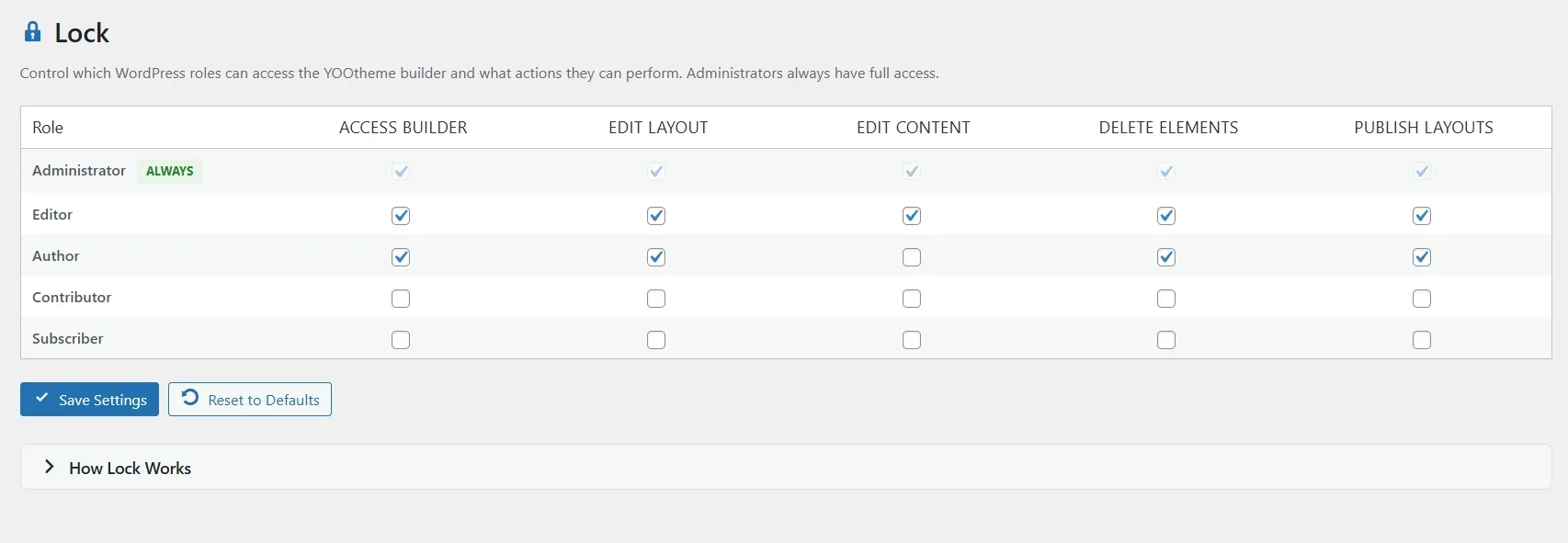
Control which WordPress roles can access the YOOtheme builder and what actions they can perform. Fine-grained permissions for teams.
Built for YOOtheme Pro
Lock uses WordPress roles to control builder access at every level. From full access to content-only editing, each permission maps directly to YOOtheme.
BUILDER ACCESS CONTROL
Choose which roles can open the YOOtheme builder. Unauthorized users are blocked automatically.
GRANULAR PERMISSIONS
Five permission levels: access builder, edit layout, edit content, delete elements, and publish layouts.
CONTENT-ONLY MODE
Let editors update text and images without changing the page layout. Perfect for content teams.
HOW IT WORKS
No setup required. Toggle Lock on from the YOOfoundry dashboard and configure permissions from a simple matrix.
ASSIGN ROLES
Open the Lock dashboard and use the permission matrix to grant capabilities to each role. Administrators always have full access.
USERS WORK SAFELY
Each user sees only what they have access to. Content editors can update text and images. Layout designers can restructure pages. Permissions are enforced automatically.
STAY IN CONTROL
Reset permissions to defaults at any time. All changes are applied instantly through WordPress roles.
Users with Edit Content but without Edit Layout can update text, images, and media inside existing elements. They cannot add, remove, or reorder elements on the page.